
Why a Site Can Be Up for Us and Down for You
You open a site and it fails. The status page on our side says the site is fine. Both answers can be true at the same time.
Many readers land here after searching for a website not loading on my computer. Neither side is lying, and neither side is broken in a simple way. The gap between the two answers is not a trick. It comes from the road between you and the site.
Two roads to the same door
Every visit to a site travels along a chain of networks. Our live check starts from our own machines, on our own network, in our own building. Your visit starts from your home, your street, and your provider. The two chains share only the last step, the site itself.
Think of the site as a shop with one front door. Two streets lead to that door from two different towns. A closed street in your town says nothing about the door itself.

A green result from us proves one thing with care. The site itself is alive and answering someone. It cannot prove that your own road to the site is clear. A fault can sit on your road alone and leave ours untouched.
How routing and regional faults split the answer
Your provider picks the route your visit takes across the internet. That route passes through cables, exchanges, and other networks on the way. One broken link in that chain stops your visit cold. The same break leaves visits from other towns and countries running fine.
Regional faults work the same way on a bigger scale. A cut cable or a failed exchange can close one district off from a site. People two streets away, on a different feed, load the same pages with no trouble. The site never went down in either case. The road to it broke for one group of visitors only.
Providers also hand your visit between each other on the way. A fault at one handover can hurt one provider and spare the rest.
DNS can point you at a different door
Before any page loads, your device asks where the site lives. That question goes to a DNS service, and the answer is an address. Your provider runs one DNS service, and we run another. The two services do not always give the same answer.
Your answer can point at an old or dead address for the site. Our answer can point at a live one at the same moment. Your browser then knocks on a door where nobody answers. Stale records are a common cause of this split. A provider can hold an old answer long after the site moved.
Phones and laptops cache the answer they got last time too. A cached answer can send you to the dead door again and again. Changing your DNS swaps the service that answers your question.
Refused at the gate by blocks and filters
A site can also turn visitors away on purpose. After abuse from one range of addresses, a service can block that whole range. Every customer of one provider then hits a locked gate. The site stays up for the rest of the world at the same time.
Nothing on the home setup is broken in that case. The block sits at the site, aimed at the road you came in on. One bad actor inside a range can bring the block down on thousands of homes. People inside the blocked range did nothing wrong themselves.
Filters at your end can close the gate from inside. Work and school networks filter pages as a matter of policy. A page that loads at home can stop dead on the office network. Security tools and parental controls can block a site in the same way.
Reading the reports map for your answer
The reports map draws this split in dots. Each dot is a report from a real visitor in that place.
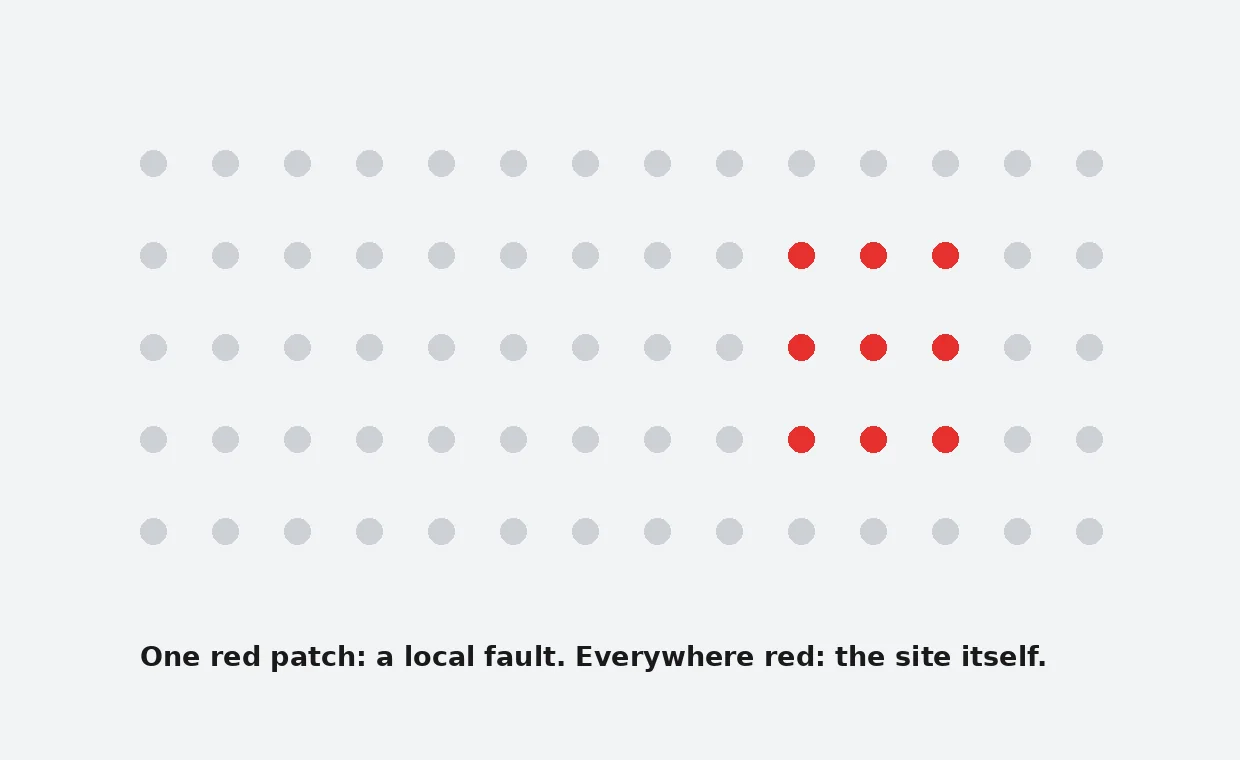
One tight red cluster in a single area points to a local fault. The provider, the district feed, or the DNS of that area is the likely home of the fault. Dots spread across many countries tell a different story. A wide spread means the service itself is in trouble.
Fresh reports from far apart places carry more weight than old ones. The map cannot name the broken part for you. It shows where the pain sits, and that is often enough.
- A tight cluster near you means the fault sits close to home.
- A thin spread over one country points at one provider or one region.
- Dots across the world mean the site itself is failing.
Your three tests, in order
Three quick tests sort a local fault from a site fault.
- Load the site on mobile data with Wi-Fi off.
- Change your DNS and try the site again.
- Ask a friend on another provider to open the site.
Mobile data uses a different road from your home line. If the site loads there, your home road holds the fault. A new DNS answer fixes the split when the old answer was stale.
Our guide on changing your DNS walks through the swap step by step. The wider test sits in is it down for me or everyone, our step by step check.
Start from the home page to see the live status of the site first. Browse all our guides when the next fault lands on a different service.
When the whole street shares the fault, waiting is the honest fix. Regional faults clear when the provider repairs the broken link. Write down which test passed before you change anything else.
Frequently Asked Questions
Why does the status page say up when the site fails for me?
Our check reaches the site from our own network. Your road to the site can break while ours stays clear.
Can my provider block a site by accident?
A provider rarely blocks a page on purpose at home. Routing faults and stale DNS answers cause most local failures.
What does one red cluster on the map mean?
A tight cluster in one area points to a local fault. The provider or the area feed is the first place to look.
Does changing my DNS really fix a site that will not load?
It fixes the cases where your old DNS answer was stale or wrong. Your browser then gets a fresh address for the site.
How long should I wait before I try again?
Give a regional fault a little time before you change more settings. Test on mobile data now and then, and watch the reports map.